
PDF to Quiz in Minutes (2025): Bloom-Aligned & LMS-Ready
PDF to Quiz in Minutes (2025 Guide): Turn Chapters into Real Practice
Summary
Upload any PDF (textbook chapters, lecture notes, research articles) → get ready-to-use MCQ, T/F, fill-in, and short-answer questions.
Dial difficulty with Bloom’s Taxonomy (remember → evaluate) so students practice the way they’re graded.
Works with long documents, page ranges, tables, and images; keeps items grounded in your source.
Export to Canvas/Moodle/Google Forms/Kahoot, or save to a reusable question bank.
Bonus: spin the same PDF into a study guide and flashcards in one session.
Why turn PDFs into quizzes?
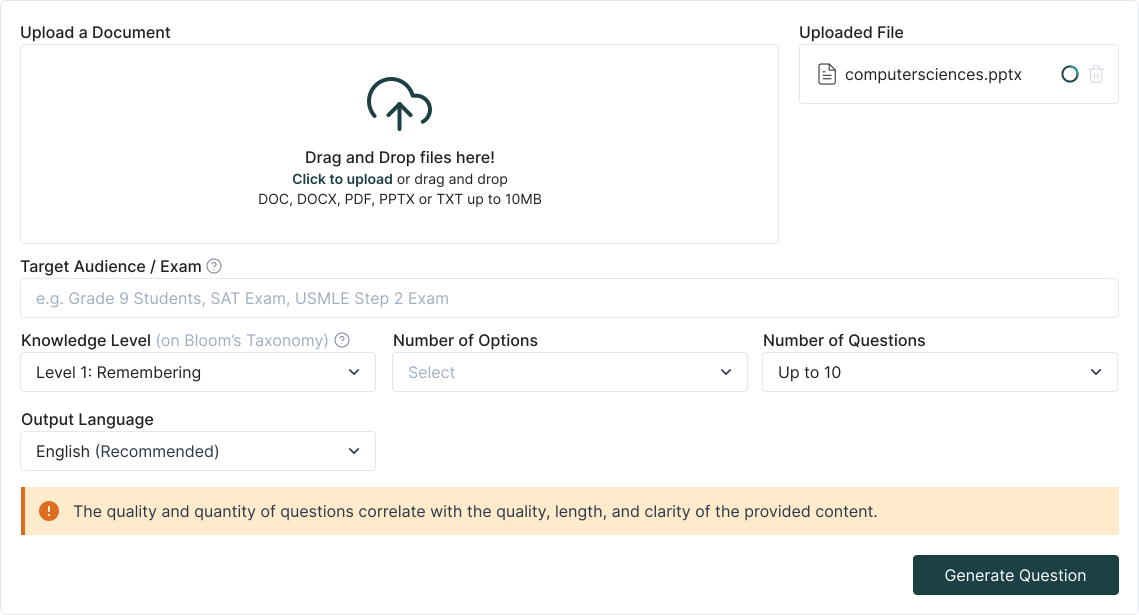

Step-by-step: PDF to Quiz
1. Upload your PDF
Drop a chapter, study packet, or full course reader. You can select page ranges (e.g., 33–58) to focus on a single topic.
2. Choose your goal
Quick check: 10–15 mixed questions from the selection, Exam build: generate by section, tag items by topic/outcome, Self-study: create a short quiz + flashcard set + study guide
3. Set the cognitive level (Bloom)
Mix recall (“define, list”) with higher-order prompts (“compare, diagnose, evaluate”) to mirror your assessment style.
4. Auto-generate & refine
Edit stems/distractors, add hints, attach citations (page or paragraph), and shuffle choice order. Keep the good ones in your question bank.
5. Export & share
Copy to clipboard for Canvas/Moodle/Forms, download CSV, or publish a practice set directly for your class or study group.
What makes TurinQ great for PDF-based assessment?
Grounded questions, fewer guesses
Items are built from your document, keeping terminology on-syllabus and reducing “model drift.”Multi-format savvy
Reads headings, paragraphs, tables, figure captions—even text in embedded images—so questions reflect what students actually see.Bloom on tap
Turn a definition into an application case or a mini-critique with one click. Build banks that cover remember → create.Reusable banks & insights
Tag items, track difficulty, and use performance analytics to spot weak outcomes before the exam.
Educator recipes you can steal
Reading compliance quiz (10 minutes)
Select pages 12–25 → generate 10 questions (70% recall, 30% analyze) → drop into LMS as a pre-class check.Unit test pool (30–45 minutes)
Upload 3 PDFs (lecture notes + article + lab guide) → produce a 60-item bank tagged by outcome → export to Canvas, keep extras for make-ups.Case-based warm-ups (5 minutes)
Take a clinical/case PDF → ask for application-level short answers → use as think-pair-share prompts.

Student workflows (study smarter, not longer)
Chapter sprint: upload tonight’s reading, run a 6-question mixed quiz, convert mistakes into flashcards, repeat tomorrow.
Research article drill: pull key terms, methods, and limitations; practice analysis-level questions before journal club.
Finals stack: combine PDFs from multiple weeks into one bank; filter by topic and difficulty for targeted review.
Quality controls & pro tips
Too easy? Increase Bloom level or add constraints (“compare X vs Y in context Z”).
Too hard? Flip prompts down a level and add hints or partial credit.
Long PDFs? Use page ranges and build section by section; merge items into one bank later.
Diagrams/tables? Attach figure numbers and ask interpretation questions (what trend does Table 2 show?).
Duplicate coverage? De-dupe when adding new PDFs to the same bank.
Next steps
Start with TurinQ for free today!
Ready to try? Start with a single chapter → PDF to Quiz (free to test).
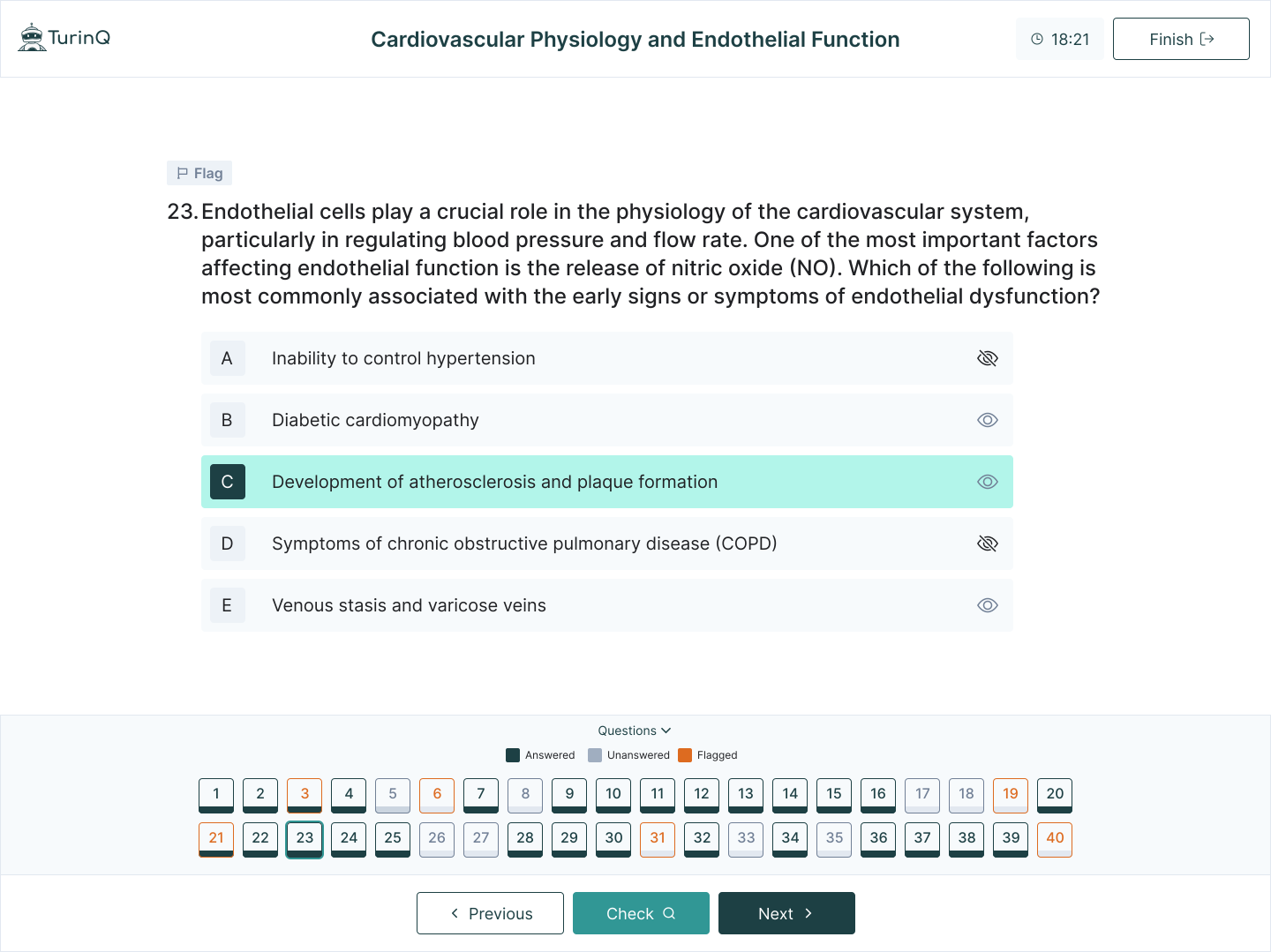
Level up your course: explore AI Question Generator (Bloom-aligned) and AI Study Guide Maker for a full mastery loop.
Frequently Asked Questions
Does it work with scanned PDFs?
Yes—if text is selectable. For image-only scans, use the built-in OCR step first, then generate questions.
Can I control the item mix?
Absolutely. Set proportions (e.g., 60% MCQ, 20% T/F, 20% short answer) and a Bloom distribution.
Will students see sources?
You can attach page or paragraph references to each item, ideal for open-book or research-methods courses.
LMS compatible?
Export via CSV/clipboard for Canvas/Moodle/Google Forms/Kahoot. Banks are reusable across sections and semesters.
Table of Content
Recent Posts



Shapes Flashcards

Number Flashcards

Colors Flashcards
