
Switch from Turbolearn to TurinQ (2025 Guide)
How to Switch from Turbolearn.ai to TurinQ.com (Complete 2025 Migration Guide)
Summary
- TurinQ is built as an Intelligent Assessment Engine (not just a note converter): Bloom-aligned quizzes, spaced repetition, powerful quiz-maker, grounded generation, and memoryful AI Study.
- You can move all study inputs—PDF/PPT/Text, Video/YouTube, Audio, Web/Wikipedia, Images & Handwritten Notes—into TurinQ and rebuild a durable question bank.
- Value tip: TurinQ’s free plan lets you create a personal question bank and generate unlimited manual quizzes from it; advanced AI features start around $4.20/mo (annual).
Why switch?
Deeper pedagogy & reliability. TurinQ aligns items with Bloom’s Taxonomy and bakes in spaced repetition, which supports long-term mastery—not just cramming. Platform positioning and LMS/API signals point to a mature, classroom-ready build.
Quiz power. Multi-type items (MCQ, T/F, fill-in-the-blank, open-ended), granular controls, Smart AI Generation, and AI explanations when you miss.
Accuracy & study flow. Text-to-Quiz grounds question creation in your text to reduce hallucinations; AI Study keeps conversation context like a real tutor.
Price & free plan. TurinQ’s free tier is useful long-term; Turbolearn’s is ~2h + 5 questions/month, which functions like a trial.
Pre-migration checklist
- List your sources: PDFs, slides, exported notes, video links, audio lectures, webpages/Wikipedia, images of notebook pages. (TurinQ supports all of these.)
- Pick your goals: quick practice sets, graded exams, flashcards/SRS, study guides, or research chat.
- Decide on pedagogy: which modules target recall, application, analysis, evaluation (Bloom levels).
- Create your TurinQ account and start the free plan to seed a durable question bank.
Step-by-step migration
Step 1 — Bring your content into TurinQ
Use the matching “→ Quiz” flow for each input:
- PDF / PPT / Text → Quiz: ingest course packs or slides and generate grounded items.
- Video / YouTube → Quiz: feed lecture links or recordings.
- Audio → Quiz: import voice notes/lectures.
- Website / Wikipedia → Quiz: capture authoritative pages into practice.
- Image / Notes → Quiz: upload handwriting photos to turn notebook content into quizzes/flashcards.
Tip: Start with handwritten notes first—this is where many tools fall short and where TurinQ saves the most time.
Step 2 — Seed a Question Bank you can reuse forever
Manually add your best items (definitions, core steps, tricky distractors). TurinQ’s free plan lets you generate unlimited quizzes from this bank—so you can practice before paying for anything.

Step 3 — Fill gaps with Smart AI Generation
Don’t have a source for a topic? Use Smart Generation to create a full set from topic + audience + knowledge level, then edit stems/distractors.
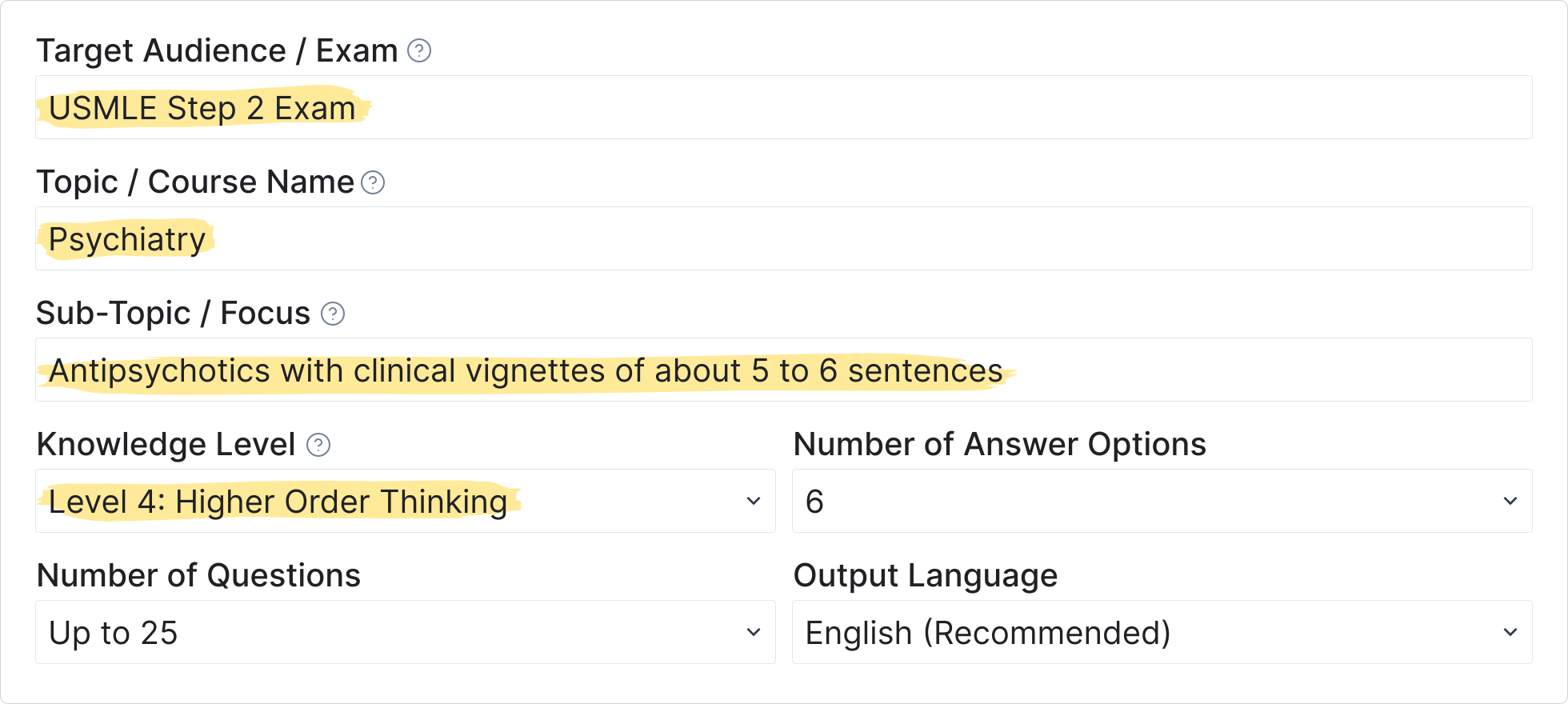
Step 5 — Turn mistakes into learning with AI explanations
On wrong answers, use built-in AI explanations to reinforce concepts—testing becomes teaching.
Step 6 — Extend beyond quizzes: Study Guides, Flashcards & SRS
- Convert modules into study guides and flashcards; schedule spaced repetition for durable retention.
- Use AI Study to ask follow-ups, compare concepts, and generate practice based on the same context—like a tutor with memory.
Step 7 — For educators & teams: delivery and scale
- Run assessments in TurinQ or export/share as needed; the platform signals LMS (Moodle/Canvas) compatibility and API options for institutional workflows.
- Use Bloom levels to blueprint exams by week/module; recycle items from your bank to keep difficulty consistent.
Mapping: Turbolearn → TurinQ equivalents
Your need | Turbolearn (context) | TurinQ path |
Summaries/notes | Summary-first, quiz is secondary | AI Study + Study Guide Maker from your files; then Text-to-Quiz for grounded items. |
Quiz practice | Free tier 5 Q/month; repetitive reports | Question Bank → unlimited quizzes (free); Smart Generation for full sets; AI explanations on errors. |
Handwritten notebooks | No highlighted handwriting flow | Image/Notes → Quiz for fast capture; convert to flashcards/SRS. |
Reliability | “Beta” feel; slow/stuck; weak support (reported) | Polished, professional platform with enterprise-grade traits; LMS-ready. |
Higher-order skills | Rudimentary | Bloom-aligned quizzes + spaced repetition ecosystem. |
Common pitfalls (and how to avoid them)
- Dumping everything at once: Start with core modules to avoid noisy item banks.
- Over-AI-ing unstudiable text: For niche definitions, prefer manual items; use AI for variety and scaffolding.
- Not grounding generation: For high-stakes topics, always Text-to-Quiz your trusted paragraphs.
- Ignoring review: Convert errors into flashcards and lean on SRS to protect long-term memory.
Pricing & value refresher
- Turbolearn: free plan ≈ 2h + 5 Q/month; paid $8.99–$20/mo.
- TurinQ: free plan with unlimited quizzes from your own bank; advanced generation ≈ $4.20/mo (annual).
Conclusion
Build your question bank today
Create your first advanced quiz for free—then scale to Bloom-aligned exams when you’re ready.
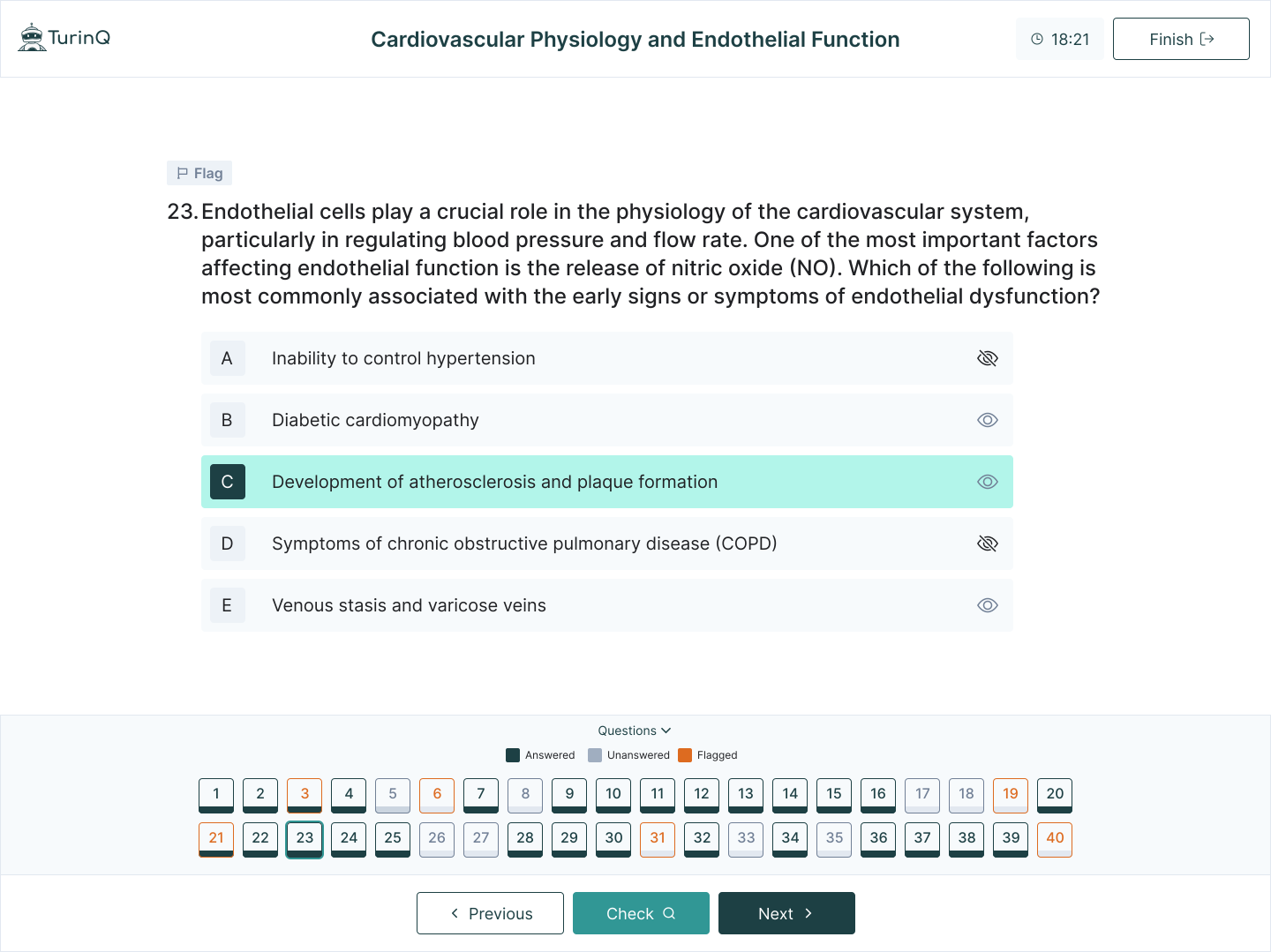
A successful switch isn’t just moving files—it’s upgrading your learning engine. With Bloom-aligned quizzes, grounded generation, memoryful AI Study, SRS flashcards, and a useful free plan, TurinQ.com turns your materials into a durable system for mastery—without the upgrade pressure or reliability headaches.
Frequently Asked Questions
Can I rebuild everything if I can’t export from Turbolearn?
Yes. Import the same PDFs/slides/links/handwriting into TurinQ. Use Smart Generation to fill gaps and Text-to-Quiz to keep items on-syllabus.
Does TurinQ support open-ended questions and grading help?
Yes—open-ended items are supported alongside MCQ/T-F/blanks, and AI explanations help turn mistakes into learning.
Is it ready for course delivery?
Signals like LMS (Moodle/Canvas) compatibility and API indicate a professional, institution-friendly approach.
References
AI Tools. (2025, August 18). TurboLearn AI features, pricing, and alternatives. https://aitools.inc/tools/turbolearn-ai
Google. (2025, August 18). Best AI note-taking apps for students. https://www.google.com/search?q=best+AI+note-taking+apps+for+students
SSBM Geneva. (2025, August 18). Best AI tools for students in 2025. https://www.ssbm.ch/best-ai-tools-for-students-in-2025/
VideoSDK. (2025, August 18). Turbolearn AI: Learn faster with AI study tools. https://www.videosdk.live/ai-apps/turbolearn
Reddit. (2025, August 18). What does everyone think about these turbolearn AI clones? r/studytips. https://www.reddit.com/r/studytips/comments/1kq71lf/what_does_everyone_think_about_these_turbolearn/
Reddit. (2025, August 18). Quizlet or Turbolearn. r/studytips. https://www.reddit.com/r/studytips/comments/1iixzzk/quizlet_or_turbolearn/
Google Play. (2025, August 18). Turbolearn – AI note taker. https://play.google.com/store/apps/details?id=ai.turbolearn
UPDF. (2025, August 18). Turbolearn AI review: Is it worth your try? https://updf.com/chatgpt/turbolearn-ai-review/
Reddit. (2025, August 18). Study Fetch or TurboLearn AI. r/school. https://www.reddit.com/r/school/comments/1jep4r7/study_fetch_or_turbolearn_ai/
TurinQ. (2025, August 18). The best Turbolearn.ai free alternative: 6 reasons why TurinQ.com is the ultimate study tool for students. https://turinq.com/turbolearn-ai-free-alternative-6-reasons-why-turinq-com-is-the-ultimate-study-tool/
Fritz AI. (2025, August 18). TurboLearn AI review: 2025 verdict. https://fritz.ai/turbolearn-ai-review/
Unite.AI. (2025, August 18). TurboLearn AI review: The ultimate study hack for students. https://www.unite.ai/turbolearn-ai-review/
TurinQ. (2025, August 18). NotebookLM vs. TurinQ.com: A comparative analysis of AI-powered learning and research platforms. https://turinq.com/notebooklm-vs-turinq-com-a-comparative-analysis/
TurinQ. (2025, August 18). Free AI quiz generator – Create custom quizzes easily. https://turinq.com/ai-quiz-generator/
TurinQ. (2025, August 18). AI quizzes with auto grading & AI feedback. https://turinq.com/ai-quizzes-with-auto-grading-ai-feedback/
TurinQ. (2025, August 18). 10 features that make TurinQ multiple choice question generator stand out. https://turinq.com/multiple-choice-question-generator/
TurinQ. (2025, August 18). Mindgrasp.ai vs. TurinQ.com: Which AI study assistant truly elevates your learning? https://turinq.com/mindgrasp-ai-vs-turinq-com-which-ai-study/
TurinQ. (2025, August 18). 10 best AI flashcard generators in 2025. https://turinq.com/10-best-ai-flashcard-generators-in-2025/
AI Tools. (2025, August 18). Turinq features, pricing, and alternatives. https://aitools.inc/tools/turinq
TurinQ. (2025, August 18). Transform text to quiz with TurinQ’s AI question generator. https://turinq.com/text-to-quiz-generator-ai/
TurinQ. (2025, August 18). Your personal learning vault. https://turinq.com/your-personal-learning-vault/
TurinQ. (2025, August 18). Mindgrasp.ai vs. TurinQ.com: Which AI study assistant is better? https://turinq.com/mindgrasp-vs-turinq-ai-study/
TurinQ. (2025, August 18). Transform audio to quiz with TurinQ’s AI generator. https://turinq.com/audio-to-quiz/
TurinQ. (2025, August 18). Knowt vs. TurinQ: The best Knowt alternative. https://turinq.com/knowt-vs-turinq-the-best-knowt-alternative/
TurinQ. (2025, August 18). Flexible pricing plans for every user. https://turinq.com/pricing-turinq/
TurinQ. (2025, August 18). TurinQ: AI quiz maker & AI study platform. https://turinq.com/
Fahim AI. (2025, August 18). TurboLearn AI review: Learn faster, smarter, and better in 2024. https://www.fahimai.com/turbolearn-ai
Text Blaze. (2025, August 18). 5 free TurboLearn AI alternatives all students should try in 2025. https://blaze.today/blog/turbolearn-ai-alternatives/
Apple. (2025, August 18). Turbolearn – AI note taker. https://apps.apple.com/us/app/turbolearn-ai-note-taker/id6502794561
Reddit. (2025, August 18). Anyone use TurboLearn AI Premium? r/school. https://www.reddit.com/r/school/comments/1m6eufv/anyone_use_turbolearn_ai_premium/
Table of Content
Recent Posts



Shapes Flashcards

Number Flashcards

Colors Flashcards
