Transform PDF to Quiz: Your PDF Documents into Effective Test Materials
The PDF to Quiz feature converts your PDF content—such as lecture notes, articles, or training manuals—into automatically generated quiz questions. Create a rich, interactive question bank in seconds and make studying or training more engaging, efficient, and measurable.
User-Friendly
Quickly generate question sets from uploaded PDFs without technical expertise.
Time-Saving
Leverage existing content to avoid creating questions from scratch.
Personal Development & Corporate Efficiency
Identify knowledge gaps and develop efficient learning strategies for individuals and organizations.
Flexibility and Reusability
Reuse question sets in different contexts and easily update them as needed.
Engage with Interactive Learning: PDF to Quiz
- By supplying the exact text you want to be tested on, you ensure that the generated questions are grounded in verifiable, relevant material.
- This approach minimizes the risk of AI-generated “hallucinations”—fabricated details or distortions that sometimes occur when AI models extrapolate beyond the provided content.


Who Benefits from PDF to Quiz?
An all-in-one solution to transform PDFs into engaging learning tools for students, educators, independent learners, and corporate teams.
Students
- Convert lecture notes, academic articles, or summary PDFs into quizzes to check your knowledge before exams.
- Identify weak points quickly, allowing you to focus on areas that need improvement.
- Reinforce knowledge by moving from passive reading to active problem-solving.
Independent Learners
- Turn your PDF resources into quizzes and test yourself on any subject you’re studying.
- Attempt the same questions periodically to track your comprehension and progress.
- Gain insights into your knowledge gaps and plan long-term improvement strategies.
Teachers, Instructors, Tutors, and Institutions
- Build a Question Bank: Automatically generate questions from PDF-based lesson notes, guides, or training materials. Then, add your own questions manually to form a comprehensive test pool.
- Manual Question Addition: Beyond the auto-generated items, craft your own questions to perfectly align with your curriculum.
- Reuse Questions: Revisit the same question sets in different semesters, training sessions, or for different groups, ensuring consistent and efficient assessment strategies.
- Future Scalability: While direct exam administration through the platform isn’t available yet, you can export the generated question sets and integrate them into your institution’s exam system or LMS to evaluate students or employees.
Corporate Training Environments
- Convert corporate training documents (instruction manuals, procedure guides, etc.) into question sets to measure employees’ knowledge levels periodically.
- Add custom scenario-based questions that reflect real-life workplace situations, creating more relevant and contextualized tests.


Key Advantages of the PDF to Quiz Feature
- Upload your PDF file and receive automatic question suggestions.
- Turn existing content into valuable test materials without extra effort.
- Generate multiple choice, true/false, fill in the blanks, open ended, multiple response, or very short answer questions.
- Different formats cater to diverse learning styles and assessment needs.
- Produce questions spanning from basic recall to complex analysis or evaluation levels.
- Gradually enhance cognitive skills and deepen understanding among learners.
- If you’re not satisfied with the automatically generated questions, edit their text, modify answer choices, or create entirely new questions.
- Tailor your question bank to meet the exact quality and content you desire.
- Use your created question sets repeatedly in the future.
- Apply the same questions at different times and for different audiences, standardizing your assessment process.
- The platform does not currently offer direct exam distribution or certification.
- However, you can export your question sets and manually integrate them into Moodle, Blackboard, Canvas, or other LMS platforms to create real exams.
Transform PDF Content into Interactive Quizzes for Effective Learning
Upload your PDF lessons to generate automatic questions, manually add new ones, and export the set for seamless integration into your school’s exam system or print them out. Ideal for end-of-lecture checklists, homework assignments, personalized tutoring sessions, and corporate training continuity, this tool helps track progress and measure knowledge retention over time.

How it Works
Upload your PDF, generate and customize questions, then export for easy integration into your exam system.
Example Scenarios for Enhanced Learning and Assessment
Pre-Exam Review (Student Perspective): Instead of solely reviewing lecture slides, convert your PDF notes into quizzes. Identify areas where you struggle and revisit those sections before the exam to reinforce your understanding.
Topic Review and Progress Tracking (Independent Learners): Regularly transform your PDF resources into quizzes to monitor your progress over time. Track your scores to gauge improvement and focus on areas that still need attention.
Expanding Your Question Bank (For Teachers and Institutions): Each semester, convert new PDF materials into quizzes to continually expand your question pool. By manually adding specialized questions, you can cover the full scope of your curriculum and ensure flexibility in assessments.

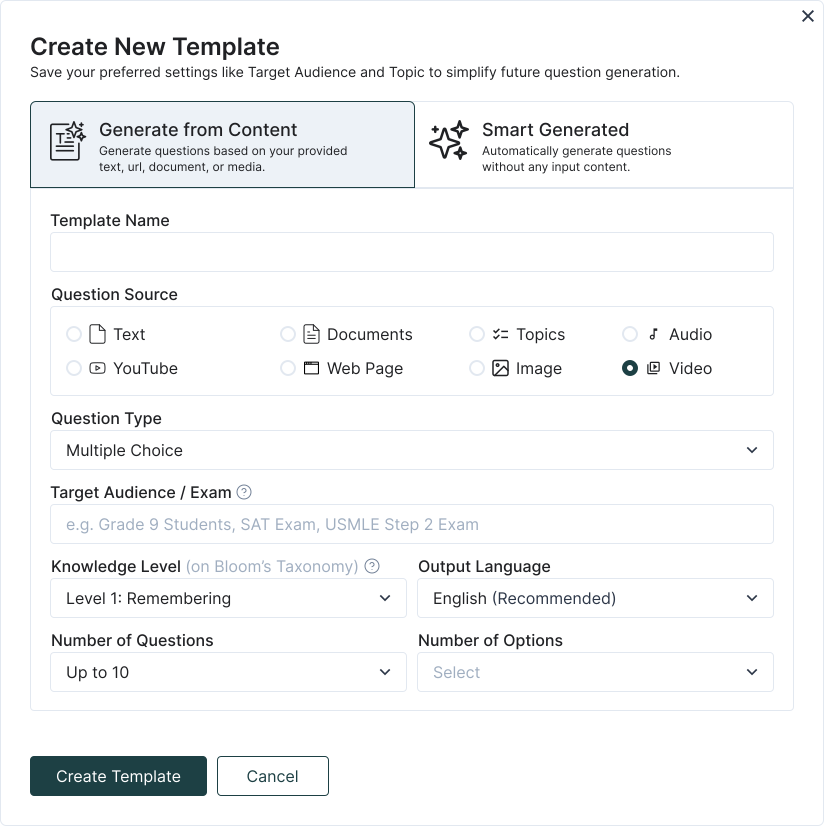
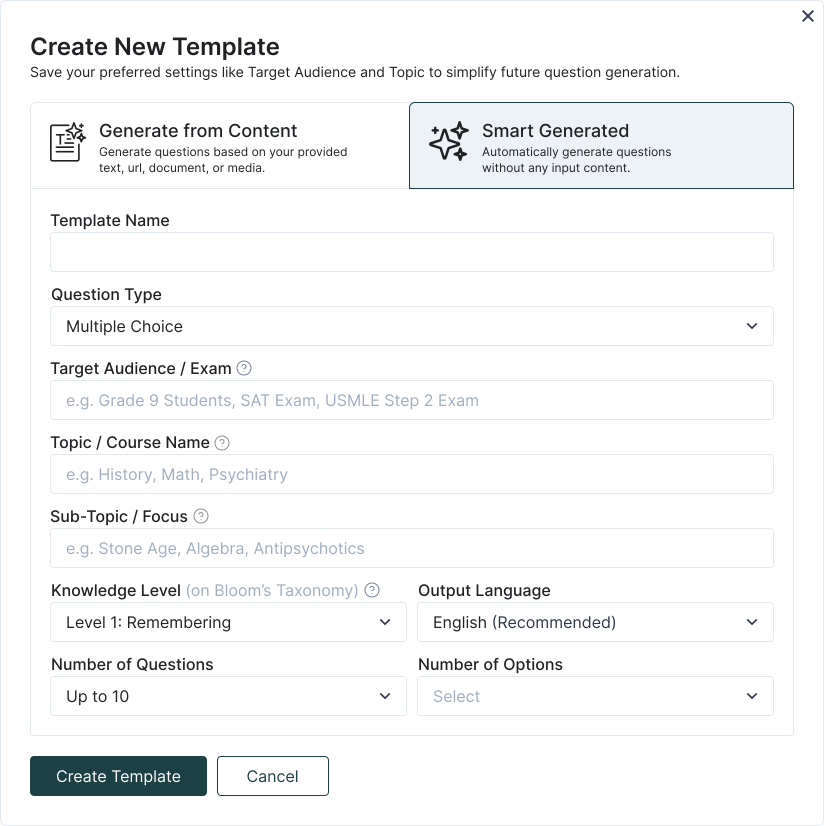
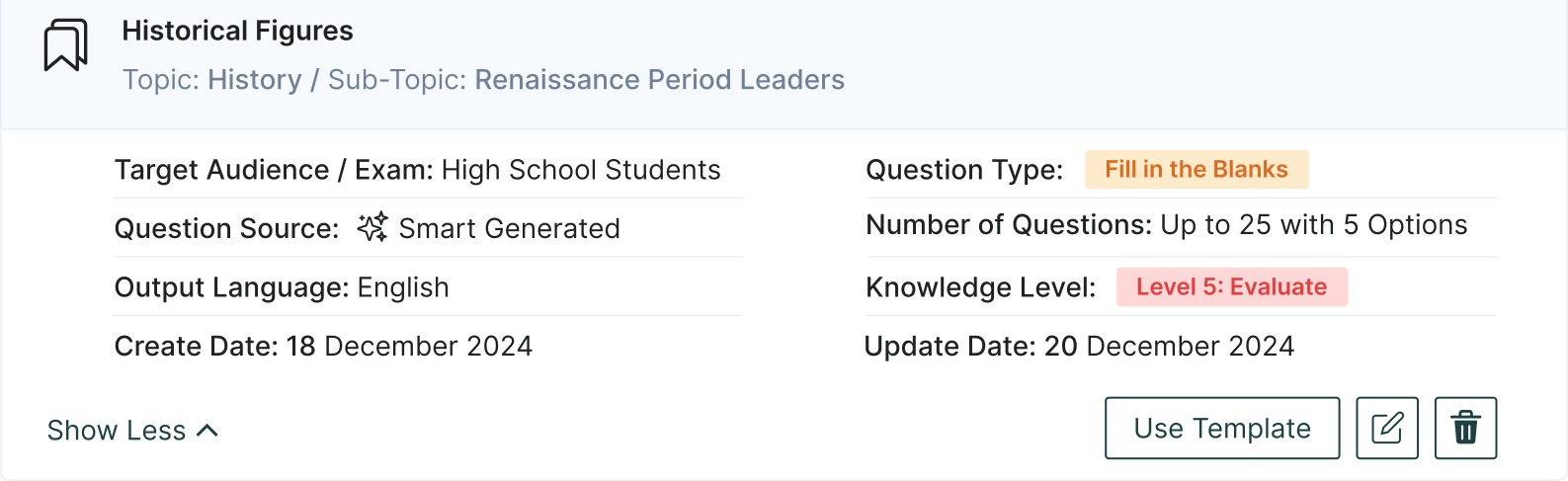
Streamlined Question Generation with TurinQ Templates
- With just one click, select your favorite template and have your quiz ready instantly. Say goodbye to repetitive steps and boost your efficiency!
- With our Template feature, you can easily save your frequently used settings—such as the number of questions, types (Multiple choice, multiple response, true/false, fill in the blanks, very short answer or open-ended), the language, target audience, topic, sub-topic—and name them however you like.
Frequently Asked Questions
Is Turinq.com free to use?
For the most part, yes! Many features of Turinq.com are completely free. You can create a question bank, manually input and save your own questions, and generate unlimited quizzes from your saved questions at no cost. However, if you wish to continue generating questions using AI after the 7-day trial, a modest and education-friendly fee will be required.
What is the "Generate from Content" feature in TurinQ?
The “Generate from Content” feature in TurinQ allows users to create customized quizzes directly from their own content, including DOC, PPTX, audio, video, topic, lecture notes, study guides, PDFs, or any other reference materials. This ensures that your quizzes are tailored to your specific learning materials, improving the relevance and accuracy of your assessments.
How can I use my PDFs to generate quizzes in TurinQ?
To generate quizzes from your PDFs or content, simply upload the content into TurinQ. The platform will analyze the PDF and automatically generate questions based on the material. This feature helps you create quizzes that reflect your exact curriculum, allowing you to study more efficiently.
What types of question formats does TurinQ support for quiz generation?
TurinQ offers a wide range of customizable question formats, including multiple choice, true/false, very short answer, fill in the blanks, open ended and multiple response questions. Whether you’re creating a basic quiz or a more advanced assessment, TurinQ supports various formats to suit your needs, ensuring flexibility and adaptability for all types of learners.
Does TurinQ support Bloom’s Taxonomy for creating quiz questions?
Absolutely! TurinQ fully supports Bloom’s Taxonomy, enabling you to create questions that cater to different cognitive levels—from remembering and understanding to analyzing, evaluating, and creating. This ensures that your quizzes not only test factual knowledge but also assess higher-order thinking skills, making your assessments more comprehensive and impactful.
What types of content can I use to generate quiz questions in TurinQ?
You can generate quiz questions from a variety of content types with TurinQ. Whether it’s lecture notes, textbooks, study guides, PDFs, video transcripts, web sites, images or any other written resource, TurinQ can analyze and transform your materials into relevant and tailored quiz questions. This versatility allows for efficient study and testing across multiple subject areas.
Can I create exams directly from my own content in TurinQ?
Yes, you can! TurinQ enables you to generate full-fledged exams directly from your own content. By uploading your reference materials—whether they’re lecture notes, PDF documents, docs, audios or other resources—you can easily convert them into comprehensive exams, ensuring that your assessments are personalized, relevant, and aligned with your curriculum or training objectives.
Recent Posts



Shapes Flashcards

Number Flashcards

Colors Flashcards
