
Turn PowerPoint to Quiz Instantly with TurinQ (2025)
Summary
TurinQ’s PowerPoint-to-Quiz tool instantly converts PPT files into high-quality quizzes, flashcards, and study materials.
It’s the fastest, most accurate way for students and educators to turn lecture slides into active learning tools in 2025.
Introduction
Educators, trainers, and students all rely on PowerPoint presentations—they’re one of the most common formats for lectures, workshops, and course content. But turning those slides into effective quizzes has always taken extra time, extra tools, and extra effort.
Not anymore.
With TurinQ’s PowerPoint-to-Quiz feature, you can instantly transform any PPT or PPTX file into a full quiz set, complete with:
AI-generated questions
Multiple difficulty levels
Bloom’s Taxonomy variation
Answer keys
Explanations
Flashcards
Study summaries
In 2025, TurinQ makes assessment creation faster, smarter, and more efficient—whether you’re a teacher preparing exams, a student studying lecture slides, or a corporate trainer building evaluations.
Why PowerPoint-to-Quiz Matters
PowerPoints are packed with information, but they’re passive learning materials. Quizzes, on the other hand, activate:
Recall
Comprehension
Retention
Critical thinking
But manually writing questions takes hours.
TurinQ solves this instantly.
Upload your slide deck → get a complete quiz in seconds → edit, export, or study.
How TurinQ Turns PowerPoint to Quizz (Step-by-Step)
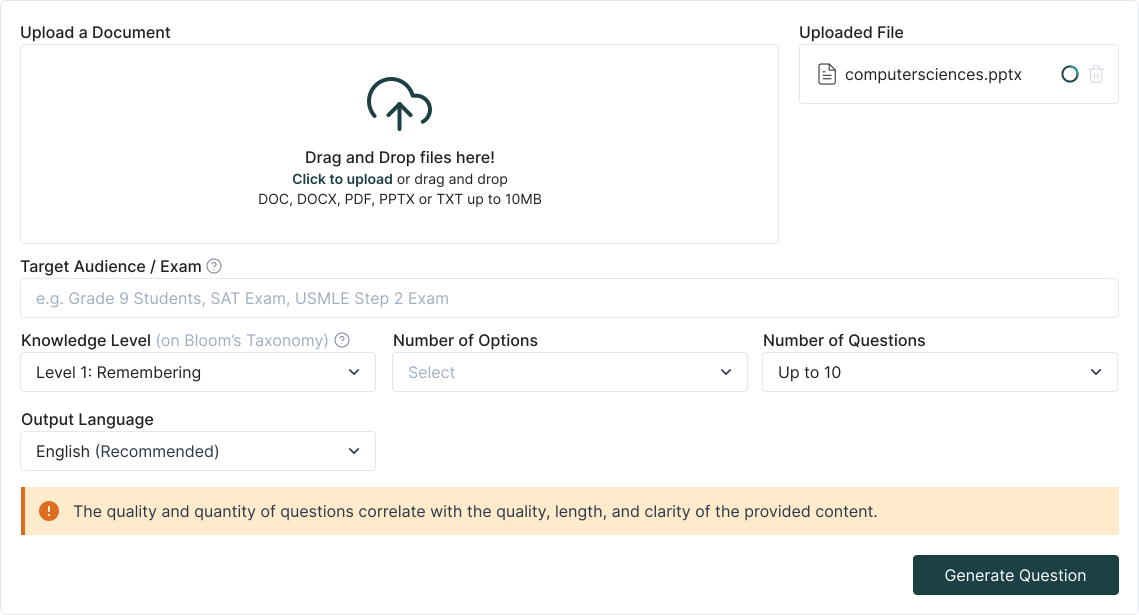
1. Upload Your PPT / PPTX File
Drag & drop your slides or upload from your computer.
2. AI Analyzes Slide Content
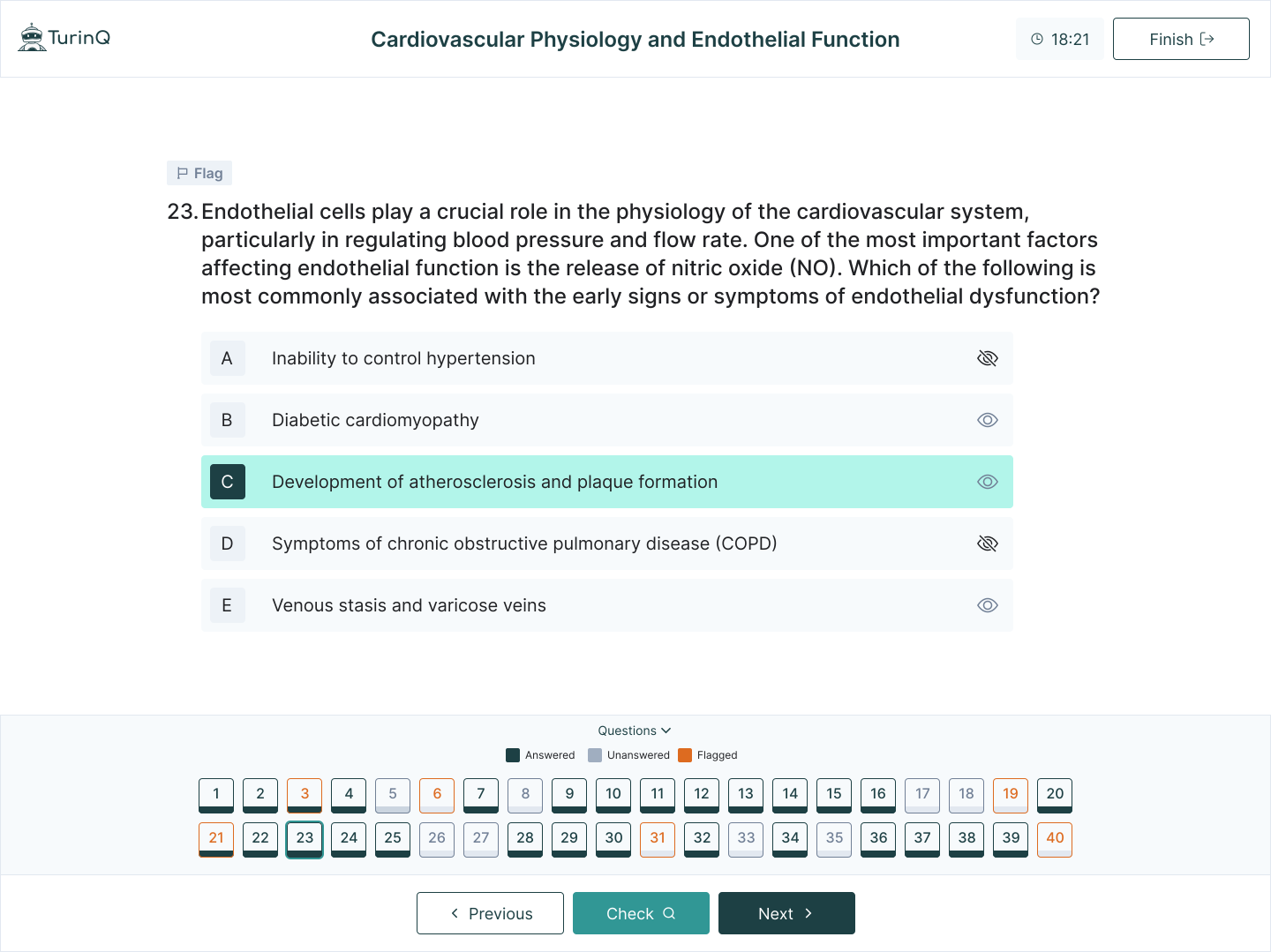
TurinQ processes text, images, diagrams, bullet points, and explanations across all slides.
3. AI Generates Quiz Items
Instant quiz generation includes:
Multiple-choice
True/false
Short answer
Open-ended response
Definitions
Concept check questions
4. Review & Customize
You can edit difficulty, add more questions, or regenerate.
5. Convert to Flashcards or Study Mode
With one click, turn the same content into:
Summaries
Explanations
Who Benefits Most?
Teachers & Professors
Turn lectures into assessments
Save hours writing quizzes
Build question banks for exams
Create homework from class materials
Auto-grade open-ended answers
Students
Study smarter by converting slides into practice tests
Generate flashcards for spaced repetition
Create summaries before exams
Understand each topic with AI explanations
Corporate Trainers
Quickly build evaluations
Train teams with adaptive learning
Repurpose company presentations into quizzes
Why TurinQ Beats Other Tools
Most study tools only extract text or generate simple questions.
TurinQ stands out with:
Bloom’s Taxonomy support
Multi-format ingestion (PDF, PPT, images, handwritten notes)
Explanations for every question
Flashcard creation
Memory tracking
Spaced repetition
Auto-grading
It’s an all-in-one study and assessment engine, not just a quiz maker.
Build your question bank today
Step into the future of learning with TurinQ – your AI-powered partner for limitless growth in teaching, learning, and self-assessment!
Frequently Asked Questions
Can TurinQ handle complex PowerPoints?
Yes—TurinQ reads text, bullet points, tables, and even images to generate accurate questions.
Does it work with PPTX files?
Yes, both PPT and PPTX formats are supported.
What types of questions does TurinQ generate?
Multiple-choice, open-ended, true/false, short answer, and concept checks.
Can teachers edit the quiz?
Absolutely. You can modify difficulty, regenerate questions, and export quizzes.
Can students use this for study?
Definitely. Students can convert slides into quizzes, flashcards, and summaries.
Is this feature included in the Yearly Plan?
Yes—all PowerPoint-to-Quiz features are included, and discounted during Black Friday.
References
AI Tools. (2025, August 18). TurboLearn AI features, pricing, and alternatives. https://aitools.inc/tools/turbolearn-ai
Google. (2025, August 18). Best AI note-taking apps for students. https://www.google.com/search?q=best+AI+note-taking+apps+for+students
SSBM Geneva. (2025, August 18). Best AI tools for students in 2025. https://www.ssbm.ch/best-ai-tools-for-students-in-2025/
VideoSDK. (2025, August 18). Turbolearn AI: Learn faster with AI study tools. https://www.videosdk.live/ai-apps/turbolearn
Reddit. (2025, August 18). What does everyone think about these turbolearn AI clones? r/studytips. https://www.reddit.com/r/studytips/comments/1kq71lf/what_does_everyone_think_about_these_turbolearn/
Reddit. (2025, August 18). Quizlet or Turbolearn. r/studytips. https://www.reddit.com/r/studytips/comments/1iixzzk/quizlet_or_turbolearn/
Google Play. (2025, August 18). Turbolearn – AI note taker. https://play.google.com/store/apps/details?id=ai.turbolearn
UPDF. (2025, August 18). Turbolearn AI review: Is it worth your try? https://updf.com/chatgpt/turbolearn-ai-review/
Reddit. (2025, August 18). Study Fetch or TurboLearn AI. r/school. https://www.reddit.com/r/school/comments/1jep4r7/study_fetch_or_turbolearn_ai/
TurinQ. (2025, August 18). The best Turbolearn.ai free alternative: 6 reasons why TurinQ.com is the ultimate study tool for students. https://turinq.com/turbolearn-ai-free-alternative-6-reasons-why-turinq-com-is-the-ultimate-study-tool/
Fritz AI. (2025, August 18). TurboLearn AI review: 2025 verdict. https://fritz.ai/turbolearn-ai-review/
Unite.AI. (2025, August 18). TurboLearn AI review: The ultimate study hack for students. https://www.unite.ai/turbolearn-ai-review/
TurinQ. (2025, August 18). NotebookLM vs. TurinQ.com: A comparative analysis of AI-powered learning and research platforms. https://turinq.com/notebooklm-vs-turinq-com-a-comparative-analysis/
TurinQ. (2025, August 18). Free AI quiz generator – Create custom quizzes easily. https://turinq.com/ai-quiz-generator/
TurinQ. (2025, August 18). AI quizzes with auto grading & AI feedback. https://turinq.com/ai-quizzes-with-auto-grading-ai-feedback/
TurinQ. (2025, August 18). 10 features that make TurinQ multiple choice question generator stand out. https://turinq.com/multiple-choice-question-generator/
TurinQ. (2025, August 18). Mindgrasp.ai vs. TurinQ.com: Which AI study assistant truly elevates your learning? https://turinq.com/mindgrasp-ai-vs-turinq-com-which-ai-study/
TurinQ. (2025, August 18). 10 best AI flashcard generators in 2025. https://turinq.com/10-best-ai-flashcard-generators-in-2025/
AI Tools. (2025, August 18). Turinq features, pricing, and alternatives. https://aitools.inc/tools/turinq
TurinQ. (2025, August 18). Transform text to quiz with TurinQ’s AI question generator. https://turinq.com/text-to-quiz-generator-ai/
TurinQ. (2025, August 18). Your personal learning vault. https://turinq.com/your-personal-learning-vault/
TurinQ. (2025, August 18). Mindgrasp.ai vs. TurinQ.com: Which AI study assistant is better? https://turinq.com/mindgrasp-vs-turinq-ai-study/
TurinQ. (2025, August 18). Transform audio to quiz with TurinQ’s AI generator. https://turinq.com/audio-to-quiz/
TurinQ. (2025, August 18). Knowt vs. TurinQ: The best Knowt alternative. https://turinq.com/knowt-vs-turinq-the-best-knowt-alternative/
TurinQ. (2025, August 18). Flexible pricing plans for every user. https://turinq.com/pricing-turinq/
TurinQ. (2025, August 18). TurinQ: AI quiz maker & AI study platform. https://turinq.com/
Fahim AI. (2025, August 18). TurboLearn AI review: Learn faster, smarter, and better in 2024. https://www.fahimai.com/turbolearn-ai
Text Blaze. (2025, August 18). 5 free TurboLearn AI alternatives all students should try in 2025. https://blaze.today/blog/turbolearn-ai-alternatives/
Apple. (2025, August 18). Turbolearn – AI note taker. https://apps.apple.com/us/app/turbolearn-ai-note-taker/id6502794561
Reddit. (2025, August 18). Anyone use TurboLearn AI Premium? r/school. https://www.reddit.com/r/school/comments/1m6eufv/anyone_use_turbolearn_ai_premium/
Table of Content
Recent Posts



Shapes Flashcards

Number Flashcards

Colors Flashcards
