
PowerPoint to Quiz: Fast, Bloom-Aligned in 2025
PowerPoint to Quiz in Minutes (2025 Guide): Turn Slides into Assessments Students Actually Enjoy
Summary
Upload your PPT/PPTX → get ready-to-use MCQ, T/F, short-answer questions.
Map difficulty to Bloom’s Taxonomy (remember → create) for real learning, not rote.
Works with mixed content (bullet points, images, speaker notes).
Export, share, or copy into LMS/Kahoot/Google Forms in a couple of clicks.
Bonus: turn the same deck into flashcards and a study guide in one session.
Why convert slides to quizzes at all?
Because assessment drives learning. Slides already distill what matters—TurinQ transforms them into questions that surface gaps, boost recall, and make revision active instead of passive. For busy educators, it’s hours saved; for students, it’s smarter practice.
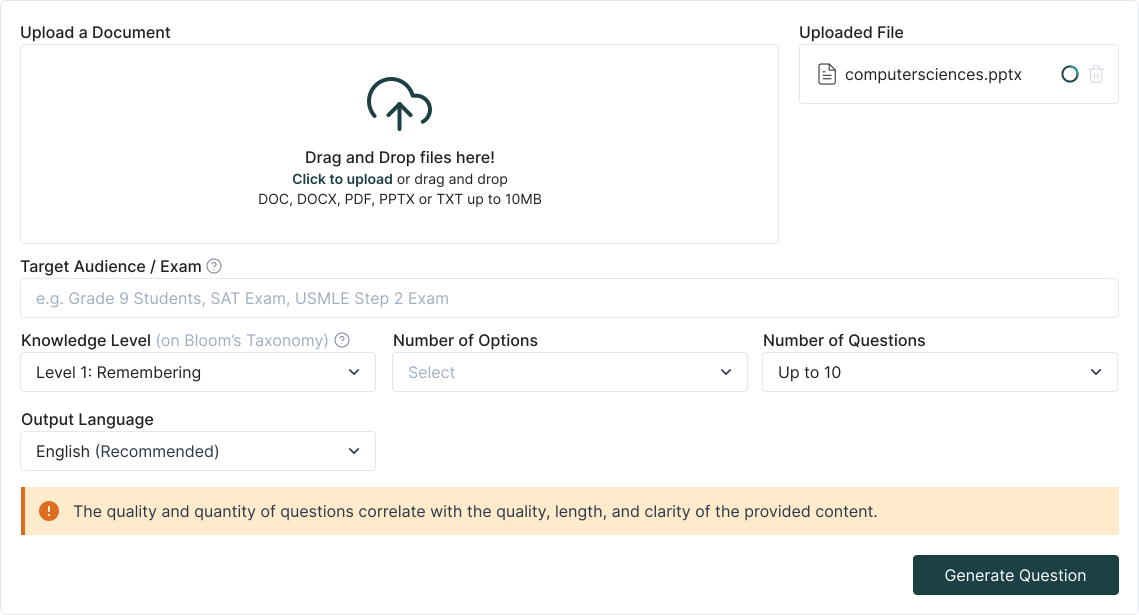

Step-by-step: PowerPoint → Quiz (no cleanup required)
1. Upload your PPT/PPTX
Drop a single lecture or a whole module. Speaker notes are parsed; slide text is de-duplicated to avoid “same question twice.”
2. Choose your goal
Quick check: 10–15 MCQs + T/F from the whole deck,Exam build: section-by-section bank with tags,Self-study: generate flashcards + short quiz combo
3. Pick cognitive level (Bloom)
Slide-level cues help generate a mix—from recall of definitions to “explain/compare/design” prompts for deeper thinking.
4. Auto-generate & refine
Edit stems, distractors, and keys inline, Set difficulty, shuffle choices, add hints, attach slide references
5. Export & share everywhere
Copy to clipboard (Canvas/Moodle/Google Forms), download CSV, or push to your question bank for reuse.
What makes TurinQ better for slide-based quizzes?
Purpose-built for education
Bloom-aligned generation and reusable question banks—ideal for course teams and departments.Media-aware
Pulls concepts from bullet points, speaker notes, and text inside images you’ve pasted into slides (handwritten formulas/labels included).Assessment-ready output
Varied types (MCQ, T/F, fill-in, short answer), LMS-friendly formatting, and per-item difficulty labels.Faster iteration
AI suggestions for stronger distractors and richer rationales (great for feedback-centric learning).
Educator recipes you can steal
- Lecture recap quiz (10 minutes) Upload the latest deck → generate 12 mixed questions → keep 8 → export to Google Forms for tomorrow’s warm-up.
- Midterm pool (30–45 minutes) Upload all Unit 1–4 decks → create a 120-item bank tagged by topic and Bloom level → share with co-instructors.
- Active learning slot (5 minutes) Generate 5 “application” questions mid-class from today’s slides; use them as think-pair-share prompts.

Student workflows (study smarter, not longer)
Pre-class priming: run your professor’s deck through TurinQ → take a 5-minute quiz to see what you don’t know.
Finals sprint: convert old PPTs into quizzes + flashcards; focus on items you consistently miss.
Group review: host a quick game using exported MCQs; rotate who explains the rationale.
Troubleshooting & quality tips
Slides too dense? Split the deck or toggle “section by section” for cleaner coverage.
Too easy? Bump Bloom to analyze/evaluate and regenerate distractors.
Duplicate content across weeks? Keep a master bank; TurinQ de-dupes when you add new decks.
Want explanations? Turn on rationales for each item to deepen understanding.
Next steps
Start with TurinQ for free today!
Ready to move from reading to mastery? Try TurinQ with your next chapter’s PDF or a YouTube lecture and feel the difference in one session.
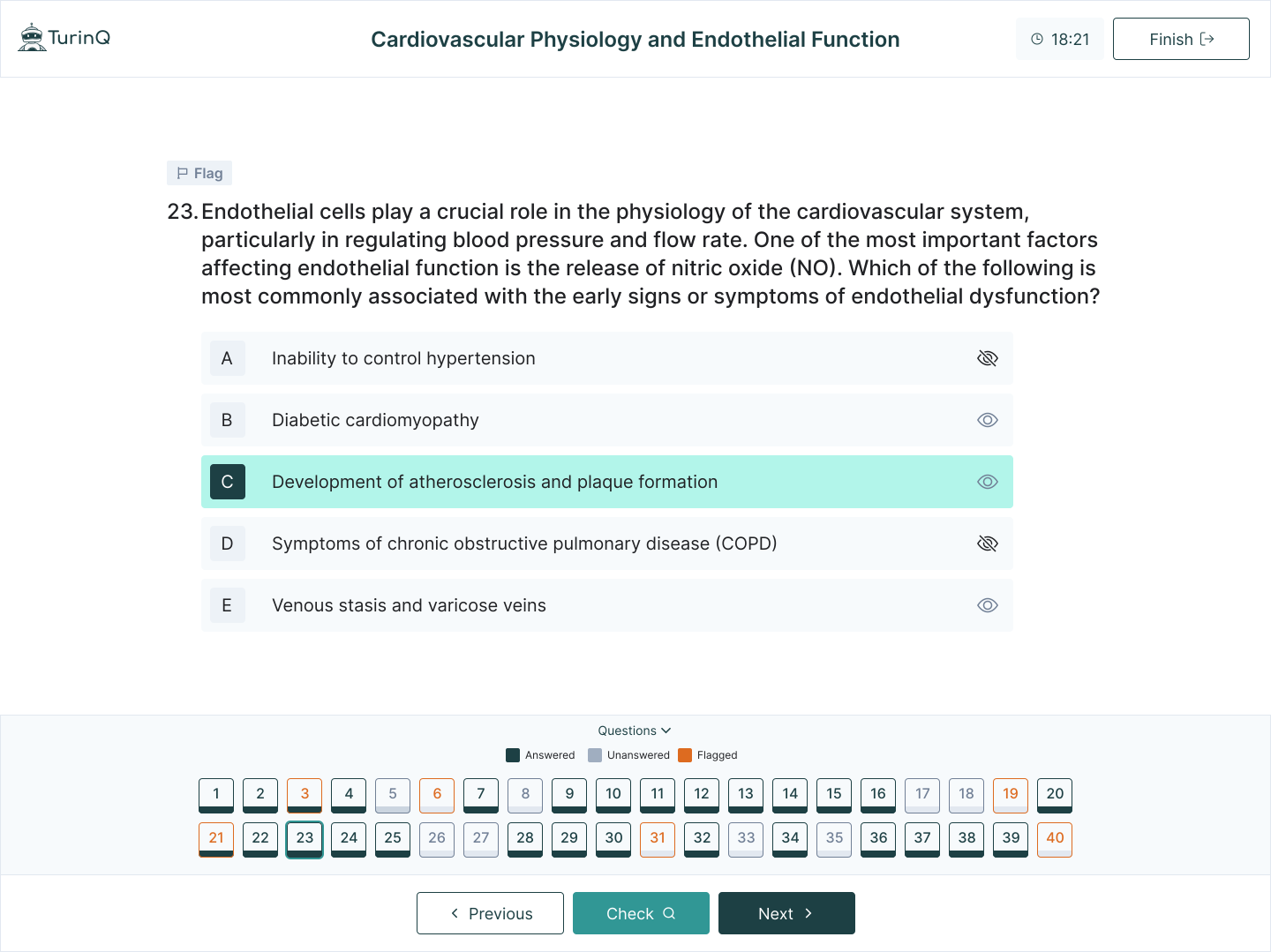
Ready to try? Start here → PowerPoint to Quiz (free to test with a small deck).
Want deeper learning? Explore Bloom-aligned AI Question Generator and AI Study Guide Maker next.
Frequently Asked Questions
Does it handle diagrams or text inside images?
Yes—TurinQ reads embedded text and common labels; you can attach the original slide snippet to the question.
Can I control difficulty?
Yep—choose Bloom levels and set an overall difficulty curve (e.g., 60% easy, 30% medium, 10% challenging).
Will it work with my LMS?
Export via CSV/clipboard to Canvas, Moodle, Google Forms, Kahoot, etc. Question banks are reusable across courses.
Table of Content
Recent Posts



Shapes Flashcards

Number Flashcards

Colors Flashcards
