
Struggling to Learn from Videos? Here’s What Actually Works
Mastering Educational Video Learning
Effective learning from educational videos requires active engagement rather than passive viewing, with research showing that strategic note-taking, using video controls wisely, and implementing regular revision can significantly improve retention and understanding of video content.
The Pause-Process-Proceed Method
The Pause-Process-Proceed method is a powerful technique for maximizing learning from educational videos. This three-step approach helps transform passive viewing into active learning by creating structured breaks for reflection and comprehension. When watching educational content, pause the video after about 10-15 minutes of instruction or when a significant concept is presented. During this pause, process the information by summarizing key points, writing questions, or connecting ideas to prior knowledge. Only after this deliberate processing should you proceed with the remainder of the video.
This method is particularly effective because it works with natural attention spans, which tend to wander after about 20 minutes of continuous instruction. You can enhance the processing phase by implementing specific activities such as:
Identifying the three most important ideas covered so far
Reviewing notes and marking confusing concepts with question marks
Creating potential test questions about the material
Discussing concepts with a study partner (in person or virtually)
Solving a related problem or applying the concept to a new situation
Cornell Note-Taking for Videos
The Cornell Note-Taking method, developed by Walter Pauk at Cornell University in the 1940s, is an excellent system for organizing information from educational videos. This structured approach divides your note page into three distinct sections: a narrow left column for cues or questions, a wider right column for main notes, and a summary section at the bottom of the page.
When applying this method to video learning, begin by preparing your note template before watching. During the video, record key information in the notes column using abbreviations and symbols to keep pace with the content. You don’t need to transcribe everything—focus on capturing main ideas and important details. After watching, review your notes and create questions or key concepts in the left column that correspond to your main notes. Finally, write a concise summary at the bottom that captures the video’s essential points. This active engagement with the material helps you transform passive viewing into effective learning, as the cue column creates built-in study questions while the summary section consolidates understanding in your own words.
Graphic Organizers for Visual Learning
Graphic organizers transform complex information into visual representations, making them powerful tools for educational video learning. These visual thinking tools—including mind maps, concept maps, and flow charts—help learners organize information, identify relationships between ideas, and improve retention of video content. They’re particularly beneficial for visual learners but enhance understanding for all learning styles by providing a structured framework to process information before, during, and after watching educational videos.
When using graphic organizers with educational videos:
Create a Venn diagram to compare and contrast concepts presented in the video
Develop a timeline to track chronological events or processes demonstrated
Use concept maps to brainstorm and organize ideas for notes or projects based on video content
Implement flow charts to visualize step-by-step procedures explained in tutorials
Build mind maps with the main video topic at center, branching out to related subtopics as they’re presented
These visual tools not only improve comprehension but also enhance critical thinking by requiring active engagement with the material, transforming passive video watching into an interactive learning experience.
Creating Self-Assessment Questions from Educational Videos
Transforming educational videos into self-assessment tools significantly enhances learning retention. After watching a video, generate your own questions based on key concepts, facts, and explanations presented. Focus on creating different question types to test various levels of understanding—multiple-choice for basic recall, true/false for concept verification, and open-ended questions for deeper analysis. This practice forces you to identify the most important information and reinforces learning through active recall.
For more systematic assessment, consider these approaches:
Create timestamp-linked questions that reference specific moments in the video
Develop questions that require applying concepts to new scenarios
Generate a mix of difficulty levels to test both basic comprehension and analytical thinking
Compile your questions into mini-exams to simulate test conditions
Revisit and refine your question bank as your understanding evolves
This self-testing strategy not only verifies your comprehension but also identifies knowledge gaps that require further review, transforming passive video consumption into an active learning experience.
TurinQ: AI-Powered Video to Quiz Conversion
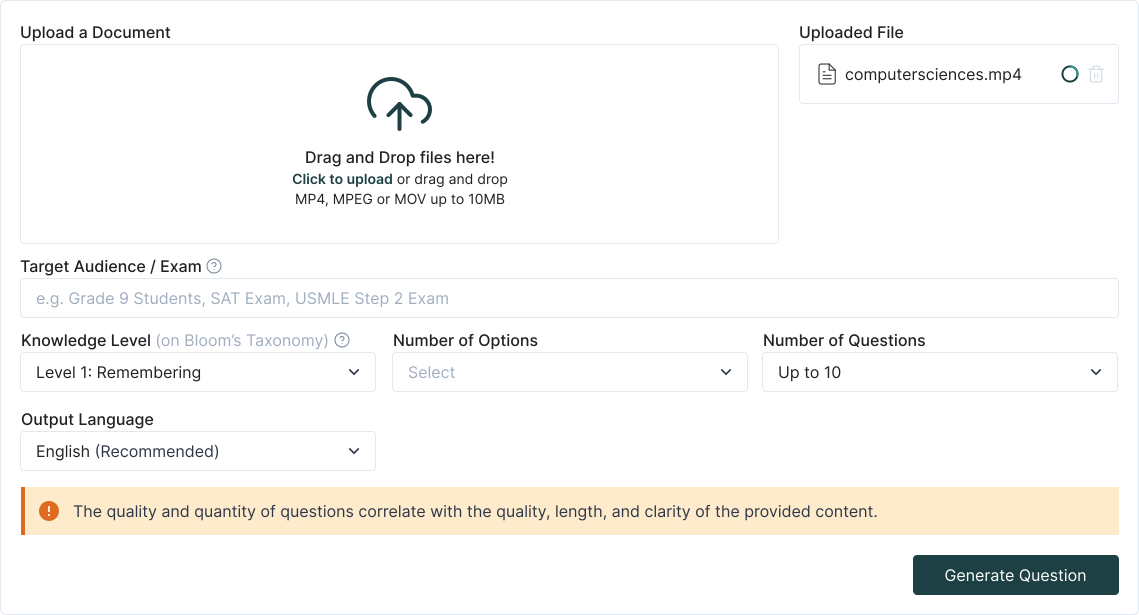
TurinQ is an innovative AI-powered platform that transforms educational videos into customized questions and assessments with remarkable efficiency. By simply pasting a YouTube video link, users can generate tailored questions that precisely reflect the video’s content, eliminating the manual effort of question creation. The platform analyzes video transcripts to ensure questions are grounded in the actual material presented, significantly reducing irrelevant or inaccurate assessments.
The system offers impressive versatility with multiple question formats including multiple-choice, true/false, fill-in-the-blank, and open-ended questions that can be adjusted to target different cognitive levels from basic recall to analytical thinking. Users can refine generated questions, customize complexity levels to match learning objectives, and save question sets for future use. TurinQ’s functionality extends beyond video processing to include other content sources like PDFs, documents, and even smart generation without input content, making it an all-encompassing solution for educators, students, corporate trainers, and learning specialists seeking to enhance assessment and knowledge retention.
Instantly create questions from video transcripts with AI analysis
Choose from various question types to test different knowledge levels
Align questions with Bloom’s Taxonomy for pedagogical effectiveness
Export quizzes to learning management systems or as PDFs
Store questions in collections for reuse across different assessments
Multi-Format Content Support for Quiz Generation
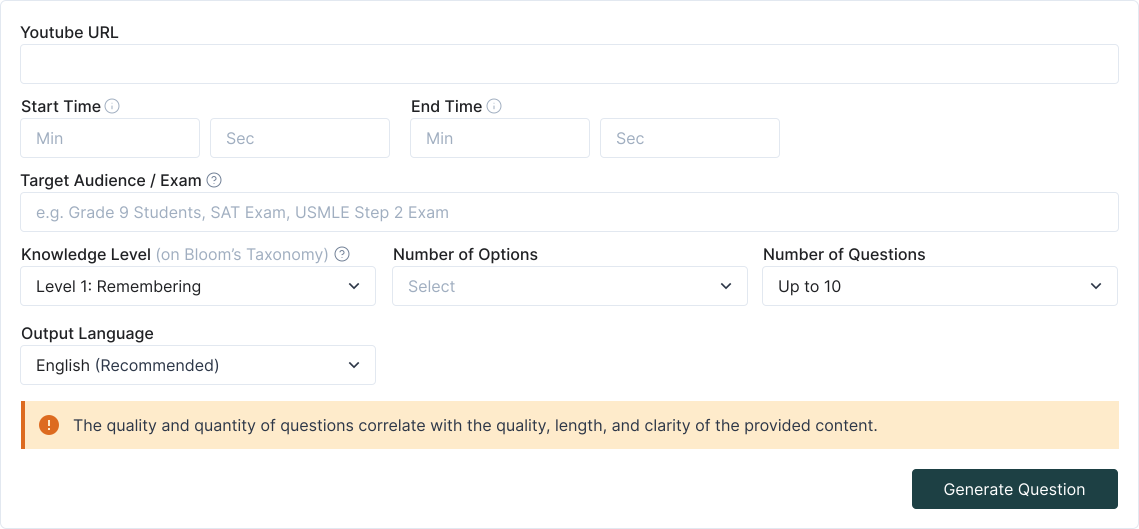
TurinQ offers exceptional versatility by supporting a wide range of input formats beyond just YouTube videos. Users can generate comprehensive quizzes from PowerPoint presentations (PPTX), PDF documents, audio recordings, images, and even Wikipedia pages or custom URLs. This multi-format support makes it particularly valuable for educators and students who work with diverse learning materials. For instance, a PowerPoint presentation can be instantly transformed into tailored questions that match specific learning objectives with just a few clicks.
The platform’s AI technology analyzes the content structure regardless of format, extracting key information to create relevant questions across multiple cognitive levels based on Bloom’s Taxonomy (Remember, Understand, Apply, Analyze, Evaluate, and Create). This flexibility allows users to generate questions that progress from basic recall to advanced critical thinking, ensuring comprehensive assessment of learning outcomes. Whether you’re working with lecture slides, textbook PDFs, or recorded lectures, TurinQ streamlines the quiz creation process while maintaining pedagogical rigor and effectiveness.
- TurinQ extracts key points from YouTube videos to create relevant and accurate quiz questions.
- Generate multiple choice, true/false, multiple response, very short answer open ended, and more.
- Adjust difficulty levels, topics, and subtopics to match your audience’s needs.
- Save hours by instantly turning video content into ready-to-use quizzes.
Frequently Asked Questions
How soon should I review my video notes after watching?
Review your notes within 24 hours of watching the educational video. This timing is crucial as it helps reinforce the information while it’s still fresh in your memory and significantly improves long-term retention.
What's the most effective way to summarize video content?
Create concise summaries in your own words that capture the main ideas. Effective summarizing strips away non-essential information, aids critical thinking about the subject matter, and helps identify knowledge gaps that need clarification.
How can I make my note-taking more visual?
Incorporate visual elements like diagrams, charts, illustrations, and mind maps alongside your written notes. Visual formats help organize information into a comprehensive overview on a single page, making complex relationships between concepts easier to understand and remember.
How often should I test myself on video content?
Test yourself several times a week until you have a complete understanding of the material. Self-testing is a proven strategy that increases comprehension and long-term retention by making the recall process cognitively demanding.
Can TurinQ generate questions for specific learning objectives?
Yes, TurinQ allows you to customize generated questions to align with specific learning objectives and different cognitive levels based on Bloom’s Taxonomy, from basic recall to advanced critical thinking.
What file formats does TurinQ support for quiz generation?
TurinQ supports multiple formats including YouTube videos, PDFs, PowerPoint presentations (PPTX), audio recordings, images, lecture notes, and custom URLs or web pages.
Can I edit the questions that TurinQ generates?
Yes, TurinQ allows users to refine and customize generated questions, adjust complexity levels, and save question sets for future use.
How does TurinQ ensure the questions are relevant to the content?
TurinQ analyzes video transcripts and content structure to ensure questions directly reflect the actual material presented, significantly reducing irrelevant or inaccurate assessments.
References
Pause-Process-Proceed Method
https://trainingmag.com/pardon-the-intermission-the-power-of-learners-pausing-video/
https://www.3blmedia.com/news/pause-process-proceed-norfolk-southern-makes-safety-personal
https://www.slideshare.net/slideshow/pause-procedure/238327934
Cornell Note-Taking Method
https://lsc.cornell.edu/how-to-study/taking-notes/cornell-note-taking-system/
https://www.utm.utoronto.ca/rgasc/media/1687/download?inline
Graphic Organizers
https://www.ebsco.com/research-starters/social-sciences-and-humanities/graphic-organizers
https://www.graduateprogram.org/blog/effective-graphic-organizers-for-student-learning/
https://courses.lumenlearning.com/suny-esc-introtocollegereadingandwriting/chapter/idea-map/
https://bookcreator.com/2023/06/10-best-graphic-organizers-for-teachers/
Creating Self-Assessment Questions from Videos
🤖 TurinQ: AI-Powered Video to Quiz Conversion Referansları
https://skillcurb.com/ai_app_locator/turinq-com-ai-question-and-exam-generator/
https://www.toolify.ai/tool/turinq-com-ai-question-and-exam-generator
Multi-Format Content Support
Table of Content
Recent Posts



Shapes Flashcards

Number Flashcards

Colors Flashcards
