
Writing Effective Multiple Choice Questions with TurinQ
Multiple Choice Questions
Multiple choice questions, when thoughtfully designed, can assess a wide range of cognitive processes from basic recall to higher-order thinking, but crafting effective questions requires careful attention to structure, language, and educational objectives.
Writing Effective Question Stems
The stem is the “question” part of a multiple-choice item that presents the problem to be solved. A well-crafted stem should be specific, clear, and succinct, presenting a definite problem that students can understand without seeing the answer options. Question stems work better than incomplete statements because they allow students to focus directly on answering the question rather than holding a partial sentence in working memory while evaluating each option. When writing stems, avoid irrelevant material that increases cognitive load and potentially decreases test validity.
Make the stem meaningful on its own – it should present a complete problem that directs students to the learning outcome.
Use a question format rather than an incomplete sentence when possible.
Avoid negative phrasing unless absolutely necessary for the learning outcome, and if used, emphasize with italics or capitalization.
Remove all unnecessary information and “red herrings” that might confuse test-takers.
Ensure the stem is focused enough to pass the “cover test” – students who know the material should be able to answer correctly even without seeing the options.
Crafting Plausible Distractors
Plausible distractors are the cornerstone of effective multiple-choice questions, serving to identify students’ misconceptions and accurately assess their understanding. These incorrect options should be challenging enough to make students pause and think critically about their selection, rather than immediately recognizing the correct answer. The most effective distractors are based on common student misconceptions, which can be systematically identified through analysis of previous student responses using methods like topic modeling and latent Dirichlet allocation.
Use distractors that represent genuine misconceptions rather than obviously incorrect or outrageous options that give away the answer.
Avoid generic options like “none of the above” or “all of the above” which often serve as easy fallbacks rather than meaningful distractors.
Consider consulting with subject matter experts to identify common errors that can inform distractor creation.
For more sophisticated approaches, analyze written student responses to construct-response questions to extract misconceptions that can be transformed into plausible distractors.
Ensure each distractor tests a specific misconception or knowledge gap rather than being randomly incorrect.
Avoiding Negative Wording Pitfalls
Negative wording in multiple-choice questions creates unnecessary cognitive complexity and frequently leads to errors, even among students who understand the material. Research shows that 31 out of 35 testing experts recommend avoiding negatively worded questions entirely. When students encounter terms like “NOT,” “EXCEPT,” or other negative constructions, they often fail to notice these crucial words, leading to incorrect answers despite content knowledge. This problem occurs because negative wording requires additional cognitive processing—students must first understand what is being asked, then mentally convert the negative question into a positive framework before selecting the correct response.
If negative wording is absolutely necessary, highlight the negative term using bold, italics, or ALL CAPS to make it immediately visible to students.
Replace negative constructions with positive alternatives when possible (e.g., instead of “Which option does NOT improve sleep quality?” use “Which option improves sleep quality?”).
Avoid double negatives entirely, as they create extreme confusion and significantly reduce question validity.
Consider using alternative terminology that achieves the same goal without negative construction (e.g., using “contraindicated” instead of “NOT recommended”).
Remember that the goal of assessment is to measure knowledge, not to trick students with complex wording or linguistic challenges.
So How Can I Generate a Multiple Choice Question?
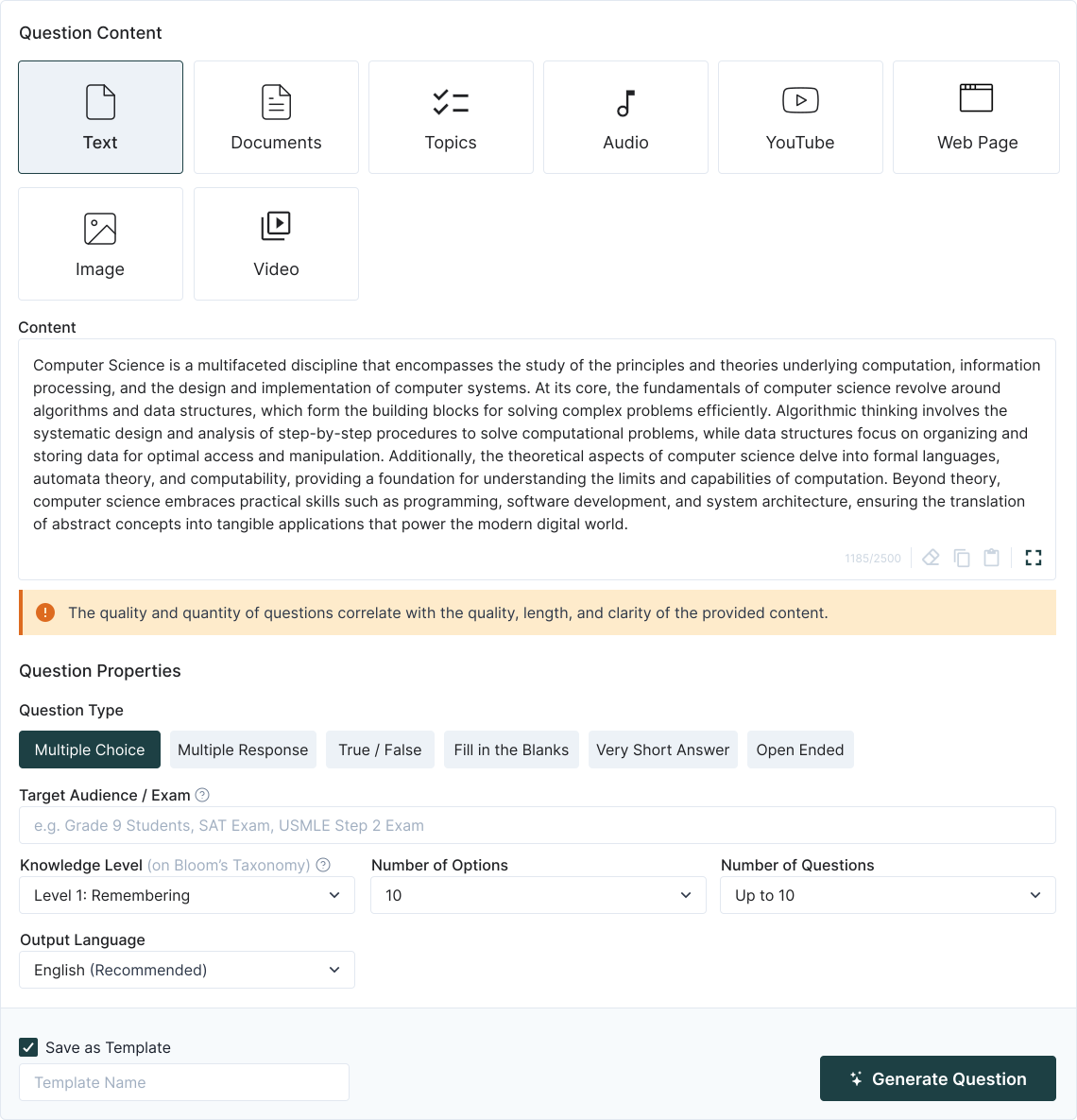
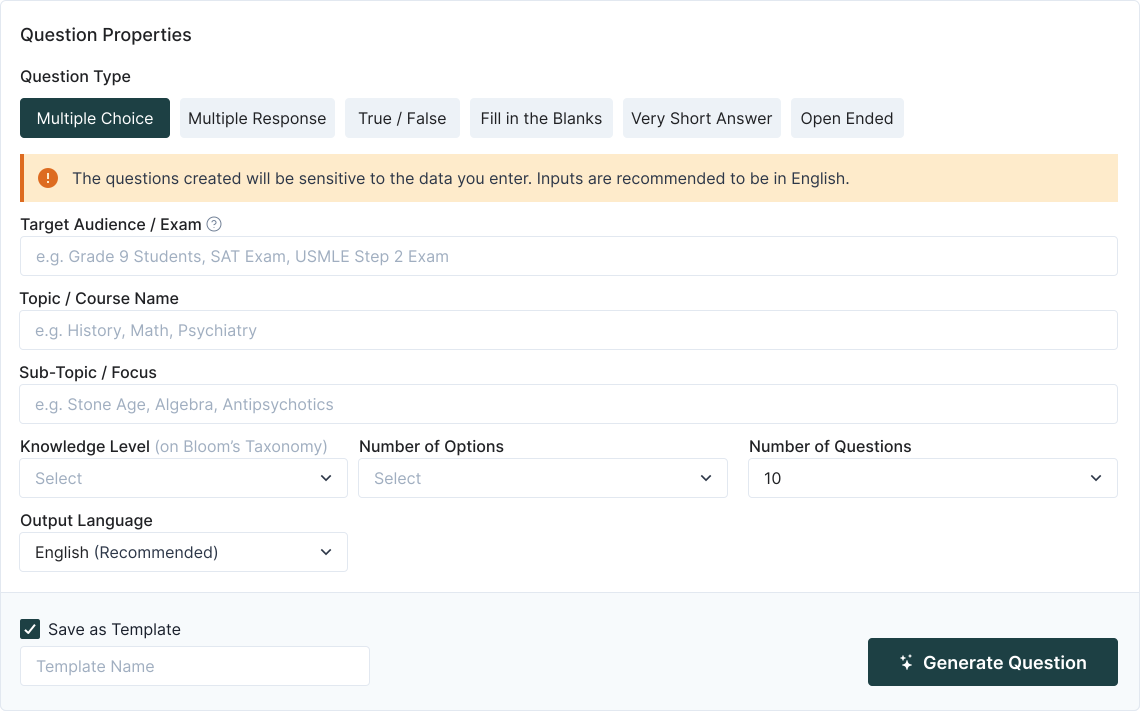
TurinQ is an AI-powered question and exam generator that transforms the assessment creation process for educators and content creators. The platform offers both content-driven and content-free question generation, allowing users to either upload specific materials (text, pdf, pptx, videos, audio) or generate questions based solely on defined parameters like subject and difficulty level. With its intuitive interface, TurinQ supports multiple question formats including multiple-choice, true/false, and open-ended questions, all aligned with Bloom’s Taxonomy to target different cognitive learning levels.
Key features that make TurinQ stand out include:
Automatic question generation that saves hours of manual work
Customizable difficulty settings to match student knowledge levels
Export options to PDF, Word, and LMS-ready formats
Question templates that streamline the creation process
Multilingual support for global education needs
Smart Generated feature that creates questions without requiring content input
Time-Saving AI Question Solution
TurinQ addresses one of education’s most significant pain points: the time-consuming process of creating high-quality assessments. By leveraging advanced AI technology, TurinQ transforms what traditionally takes hours into a task completed in seconds, allowing educators to generate questions from existing content or create them from scratch using the Smart Generated feature. This revolutionary approach eliminates the need for manual question writing while ensuring pedagogical integrity through alignment with Bloom’s Taxonomy cognitive levels (Remember, Understand, Apply, Analyze, Evaluate, and Create).
The platform’s versatility makes it valuable across educational contexts, serving educators, course creators, HR teams, and enterprises. Users can generate multiple question types (multiple-choice, true/false, fill-in-the-blanks, multiple response, and open-ended questions) and customize them based on target audience, topic, and knowledge level. With features like question templates for frequent settings, collections for archiving and reusing questions, and API integration capabilities, TurinQ streamlines the assessment process while maintaining educational rigor and relevance. The platform’s free trial offers core functionality, with paid plans starting at $6 monthly for expanded capabilities.
Frequently Asked Questions
Is TurinQ free to use?
Many features of TurinQ are completely free, including creating question banks, manually inputting questions, and generating unlimited quizzes from saved questions. However, continued AI question generation beyond the 7-day trial requires a subscription, with plans starting at $6 monthly.
How accurate are the AI-generated questions?
While no AI system guarantees 100% accuracy, TurinQ has received positive feedback from over 50,000 users worldwide, with 92.4% expressing satisfaction with the generated questions. The platform continuously improves its algorithms to ensure high-quality, pedagogically sound assessments.
What content types can TurinQ process?
TurinQ supports an impressive range of content sources:
Text documents and articles
Videos and audio recordings
Handwritten notes
Web pages and images
No content at all (using the Smart Generated feature)
Who is TurinQ designed for?
TurinQ serves multiple user groups including educators, corporate trainers, HR professionals, students, and online learning platforms. The tool’s flexibility makes it suitable for creating assessments across educational levels and professional training contexts.
How does TurinQ align with educational principles?
TurinQ incorporates Bloom’s Taxonomy into its question generation, allowing users to target specific cognitive levels from basic recall to advanced critical thinking. This ensures assessments are pedagogically sound and appropriately challenging for the intended audience.
References
Writing Effective Question Stems
https://blog.uwgb.edu/catl/writing-effective-multiple-choice-questions/
https://www.cmua.nl/cmua/Onderwijs_files/Writing%20good%20MCQ.pdf
https://teachinghub.bath.ac.uk/guide/writing-effective-multiple-choice-questions/
Crafting Plausible Distractors
Negative Wording Pitfalls
https://testing.byu.edu/handbooks/14%20Rules%20for%20Writing%20Multiple-Choice%20Questions.pdf
https://atomisystems.com/elearning/rules-for-writing-multiple-choice-questions/
https://www.ecitb.org.uk/wp-content/uploads/2022/03/MCQ-good-practice-external-v1.pdf
https://www.yarno.com.au/blog/common-multiple-choice-mistakes
TurinQ AI Question Generator
https://www.php.cn/ai-tools/turinq-ai-question-exam-generator
https://skillcurb.com/ai_app_locator/turinq-com-ai-question-and-exam-generator/
https://www.toolify.ai/tool/turinq-com-ai-question-and-exam-generator
TurinQ Platform Use and Features
Table of Content
Recent Posts



Shapes Flashcards

Number Flashcards

Colors Flashcards
